
Spam
Let's begin with spam. Dealing with email inevitably means dealing with spam. Spam is a pain. Spam causes havoc. Spam costs you time and money.
Spammers are the scourge of the internet!
Blair, Doepud
Spammers send unsolicited emails to millions of people every day, with nefarious goals in mind, usually Phishing for passwords, bank details and other sensitive data.
So what has spamming got to do with your email and your website? In a nutshell: your email address. Spammers can only operate when they have other people's email addresses to spam, so the simple solution is to keep your email address hidden from public consumption. In other words, never publish your email address on your website. With your email address, spammers will relentlessly send you virus-filled messages, sometimes multiple times a day.
It gets worse: if spammers manage to hack into your email account (a task they can only achieve when they have your email address) they will in turn harvest your entire address book and send everyone you've ever emailed a spoof email that appears to come from you! People will likely open it and install a Trojan Horse, Virus or Keylogger. You could even be responsible for contributing to a Botnet, which isn't something to be proud of.
Your email address
There are several ways of setting up and managing your email, but one simple rule applies universally: never publish your email address on your website... ever!
So how does this email thingy work? First of all, let's say you own the domain name example.com. With that you can have an email address with any username you want prepended to it, e.g. dave@example.com. If you run a small business with multiple team members, you may want to standardise how you create usernames, e.g. firstname.lastname@example.com or Firstname-Lastname@example.com. The case in usernames doesn't matter, firstname-lastname@example.com and Firstname-Lastname@example.com are essentially the same. The difference between a dash or a dot though is important to note: those emails addresses are not the same!
Email storage
Once your email address is set up, everything related to that will reside on a server, just like your website. Sometimes emails will live on the same server as your website and sometimes they will be on a separate server.

How you then access this email server, to send and receive messages, comes down to various decisions, usually informed by your working preferences and how you intend to access your emails. For example, will you want to access your email at any time and location? Perhaps you need to check new emails on your mobile phone when you've popped out of the office or are away from home? Or maybe you'll only ever need to manage emails from your main desktop computer or tablet? Here's a few common scenarios:
Email everywhere, all the time
To access emails from any device, at any time, you will need to retain everything (i.e. incoming and outgoing emails, attachments, address book, spam filters, diary, other settings etc.) on a permanent email server. Email storage like this can be included on the same server as your website or it can be a separate server provided by a third-party service like Fastmail or Proton Mail.
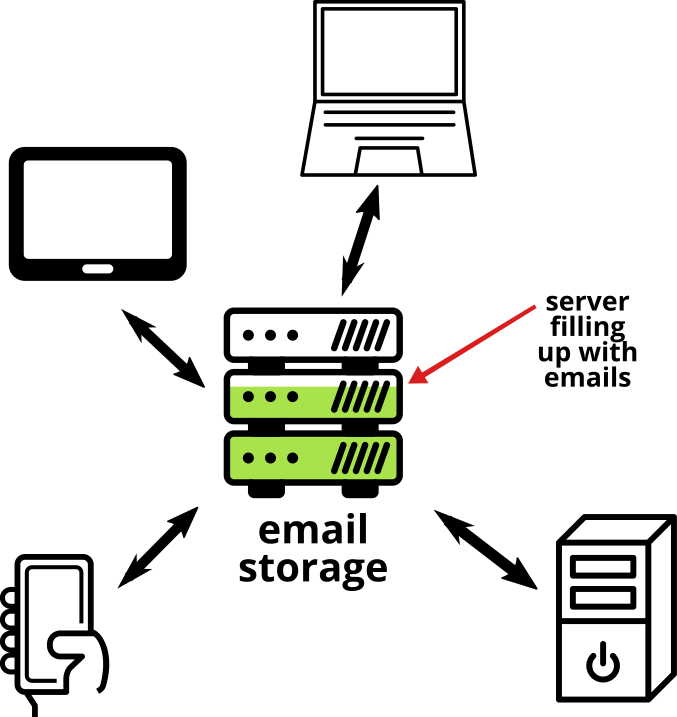
There are pros and cons of setting up your email in this way. The main advantage is that it gives you quick and easy access to your emails from any device at any time. Your emails are also being regularly backed-up, which gives you peace of mind. The downside is that ongoing costs will only ever rise as more space is taken up on the server (one solution is to continually delete old emails and large attachments).
Email from a single device
Perhaps you don't need to manage emails outside a work environment? In that case, setting up access from a single device is the solution! Of course, there's nothing stopping you from using the solution described above for multiple devices, i.e. pay for a third-party service. It not only gives you the advantage of being able to access emails from multiple devices if the need arose, but your emails are also being being backed-up regularly.
Opting for the single computer route though usually means you will be downloading your emails permanently to that computer, and therefore not needing to pay for a third-party service. Instead you would use the email service that comes bundled with most web hosting providers.
As above, there are pros and cons with the single device approach: the main advantage is that you will incur no extra storage charges (unless you opt for IMAP - see below). In contrast, you would need to manage your own back-ups and, if you change computer at some time in the future, you will need to copy your emails over to the new computer.
POP3 v IMAP
POP3 (Post Office Protocol) and IMAP (Internet Message Access Protocol) are email protocols and represent the two ways of accessing email. The difference between them comes down to email storage. POP3 means you download your messages from the server and they are deleted when you do so. With IMAP you read your messages but they remain on the server; essentially the same as the using a third-party service (like Proton Mail and Fastmail).

If you are using the email service that comes bundled with your web hosting and opt for IMAP, you may think you're getting the same service as Proton Mail or Fastmail but without the extra costs. Wrong! These specialist email providers offer a dedicated email service, with higher levels of security, encrypted transfer of messages, large attachments and many more extras you won't get with the 'free' email functionality bundled with web hosting. Apart from that, you still need to think about ongoing email storage within your hosting account. Most hosting packages come with limited space, e.g. 1GB for your whole website (including database) plus your email storage. With third-party services like Fastmail, you get 30GB of storage for a nominal annual fee.
Pop now and delete later
Many email programmes, like Thunderbird and Outlook, allow you to choose POP3 but retain email messages on the server for an agreed period of time, e.g. 1 month, before deleting them. This could allow you to use web hosting email storage and check your emails on multiple devices within the allotted time. Copies of the email are downloaded to any devices you connect with and when the time is up, those emails are deleted from the server (but not your devices).
SMTP
SMTP stands for Simple Mail Transfer Protocol and works alongside POP3 and IMAP. While the latter protocols represent the two methods for retrieving email messages, SMTP is the protocol used to send messages.
We warned you that choosing the right option isn't straightforward! Good luck :-)
Email programmes
When we talk about email programmes, we're talking about the software or internet service that allows you to access your emails, programmes like Thunderbird, Outlook, Mailspring, Apple Mail, Gmail, Yahoo! Mail and Windows Live (which used to be known as Hotmail). There are hundreds of decent email programmes and your choice comes down to budget and the features you'd like or need.
All email programmes let you connect to your email server using POP3 or IMAP. Some will cost a niminal fee while others are free.
Remember that most of the "free" programmes, like Gmail or Yahoo! Mail, will read the content of your emails to better understand who you are and to determine what adverts to show you. There's no privacy with when it comes to free.
Webmail
Another way to check your emails is by using the email client that comes bundled with your service provider. You would sign in at something like https://webmail.example.com from any device. This is an IMAP option.
Email security
No, we're not banging on about leaving your email address publicly accessible on your website this time. When we talk about email security, we're talking about TXT Records. You'll rarely need to handle these TXT records yourself but it's worth understanding a little bit about how they work. Here's the TXT records that we add for each email address we set up for you:
- SPF or Sender Policy Framework. A plain text file that our email server uses to protect your domain from being used to send spam
- DKIM or Domain Keys Identified Mail. Again, a text file that applies encryption to secure the content of your email
- DMARC or Domain-based Message Authentication, Reporting and Conformance. A form of authentication that gives you control over SPF and DKIM policies
- MTA-STS This increases security for SMTP connections when both sending and receiving servers use this standard
Sending emails from the website
Almost every website has a contact form. This means we allow a member of the public to send you an email through your website. When an email is sent from a website it officially comes from a real sender, even though the CMS code has generated it. So when you receive an email from your contact form it appears to comes from a real person (possibly yourself in some cases). To ensure that emails are sent properly we add all the TXT records (described above).
Last updated: 13 Jun 2021